National Science Foundation Funding Search Engine
Architecting a unified search ecosystem to help researchers navigate complex government funding data with ease and precision.
Role
Product Designer
Tools
Figma
Time
2022 - 2025
Tags
Search Experience
Design System
Accessibility
Background
The National Science Foundation (NSF) distributes billions in funding annually, and its Funding Search engine is one of the highest-traffic, most critical portals for researchers nationwide.
As the NSF transitioned to a modernized digital ecosystem, the core search experience was struggling with severe UX debt.
Confusing Filters: Users had to navigate through drop-downs packed with long government department names, with no clear visual feedback on what filters were currently applied.
Cluttered Results: The search result cards were crowded with redundant tooltips and unstructured text, making it hard for users to quickly scan and compare different grants.
Disconnected Searches: Active and archived funding opportunities lived on completely separate systems, forcing users to jump back and forth just to find historical data.
The Goal: Transform a dated, clunky legacy system into a clean, modern, and fully accessible search experience. My mission was to bring active and past funding data onto one unified page, turn confusing form fields into intuitive filters, and ensure every component meets strict government accessibility standards—so all researchers, regardless of ability, can easily find what they need.
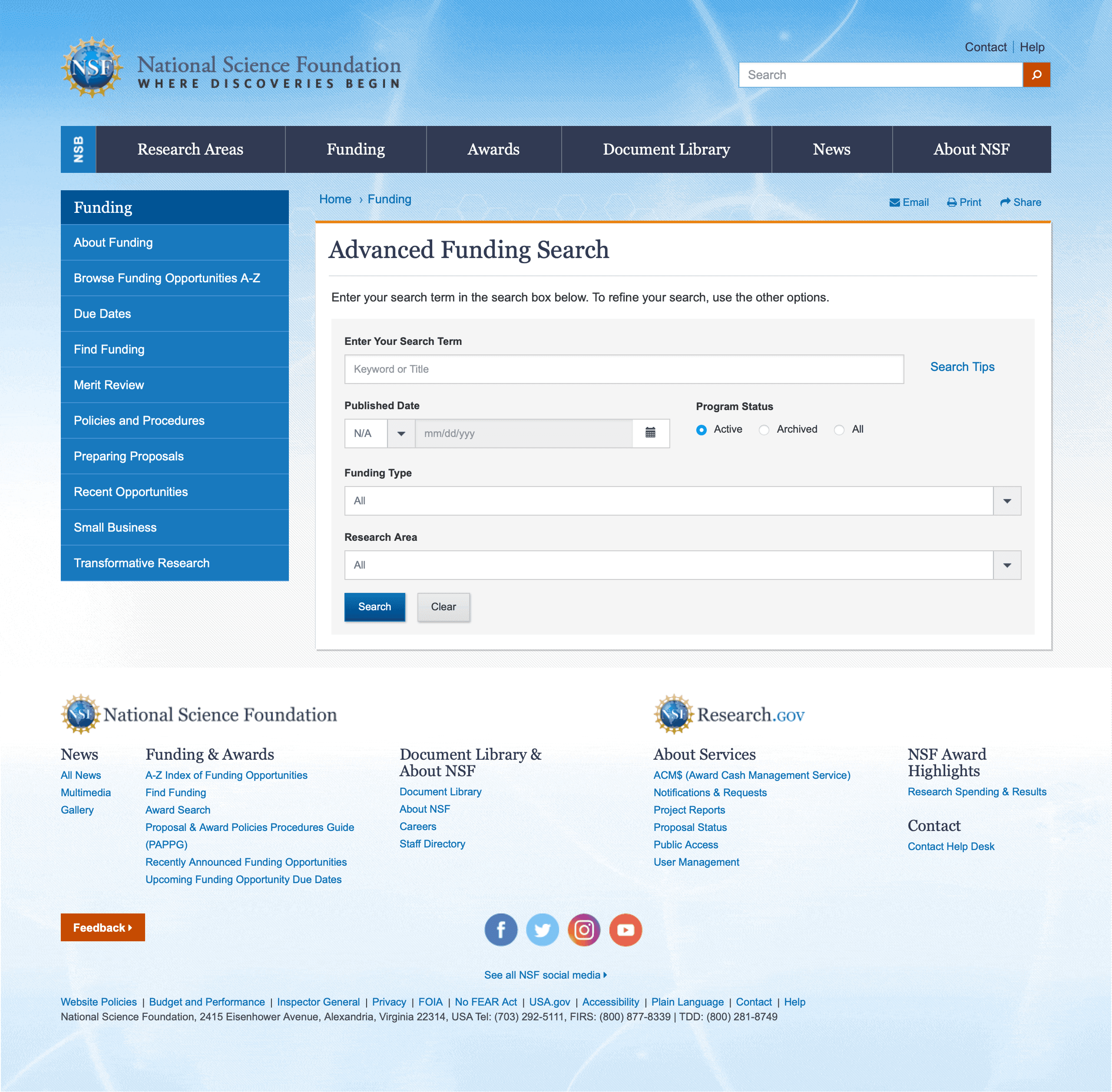
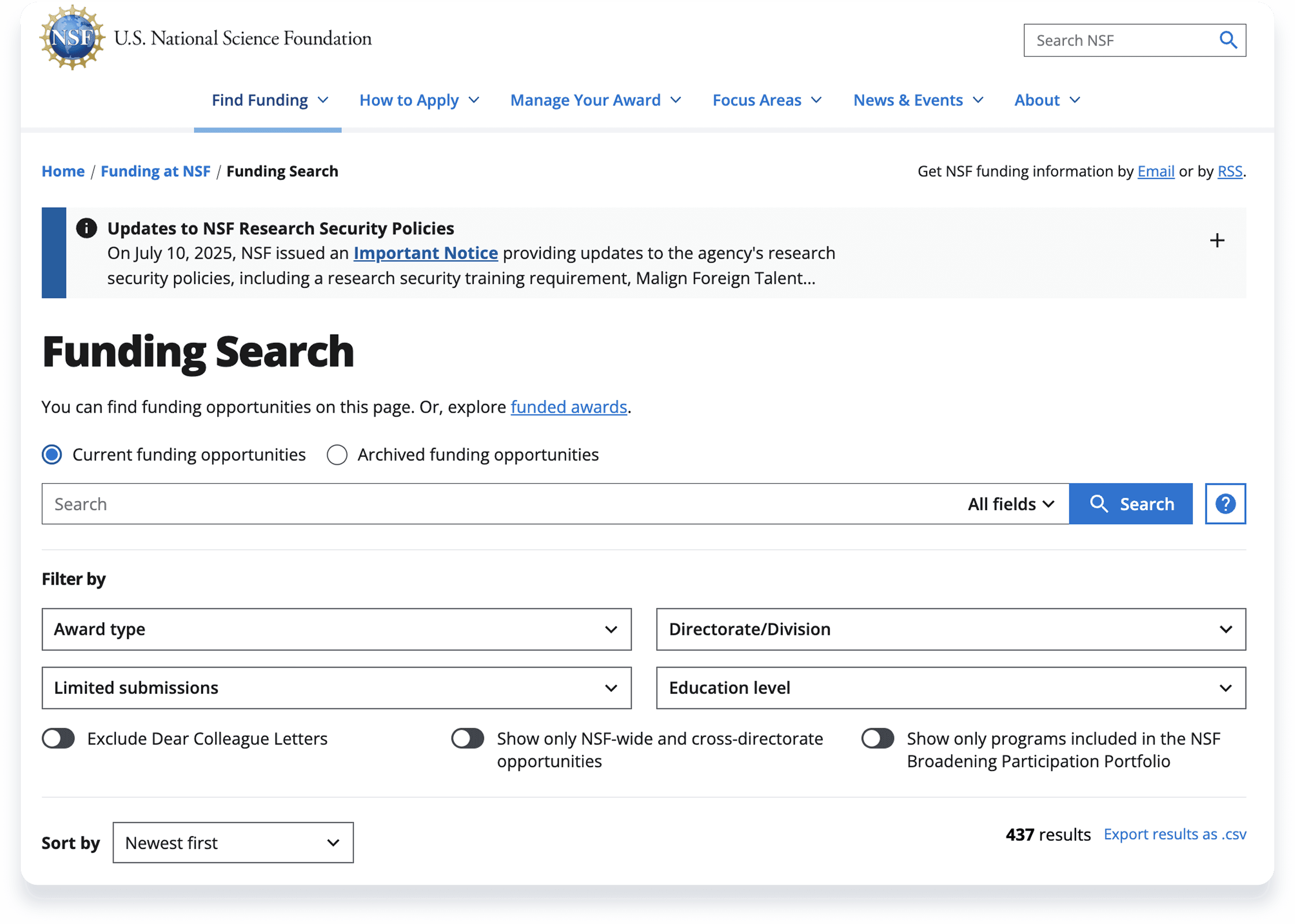
Legacy Funding Search page
Key Feature 1: Making Complex Filters Intuitive and Visible
The Problem: The NSF has a very deep organizational structure. The "Directorate/Division" filter contains hundreds of nested departments and acronyms. A standard dropdown menu would force users to scroll endlessly, making it frustrating to find what they need. Also, once they made a selection and closed the menu, their choices were hidden, making it easy to forget which filters were active.
The Solution: I designed an end-to-end filtering experience that makes finding options effortless and keeps system status completely visible.
Find Instantly with In-Filter Search: I added a search bar directly inside the deep "Directorate/Division" menu. Users can type acronyms to instantly narrow down hundreds of options. I also added dynamic numbers next to each option (e.g., 142) so researchers know how many results to expect before clicking.
Clear Parent-Child Logic: Checking a parent category automatically selects its children, making bulk selections easy.
"What You See Is What You Get": Once a filter is applied, it immediately appears as a prominent blue tag (pill) above the search area. Users never have to reopen menus to check their selections.
Effortless Management: Each tag has a clear "X" for one-click removal. For a completely fresh start, I added a "Reset all filters" link, turning a tedious manual process into a single click.
Key Feature 2: Making Complex Grant Data Easy to Scan and Compare
The Problem: The legacy search results were essentially a wall of text. Each grant was displayed as just a title followed by a dense paragraph. Critical metadata—like specific grant types, official publication IDs, and hard deadlines—were completely buried in the text. It was impossible for researchers to quickly scan the page or compare different funding opportunities.
The Solution: I transformed these unstructured text blocks into a clean, highly structured, and responsive component system.
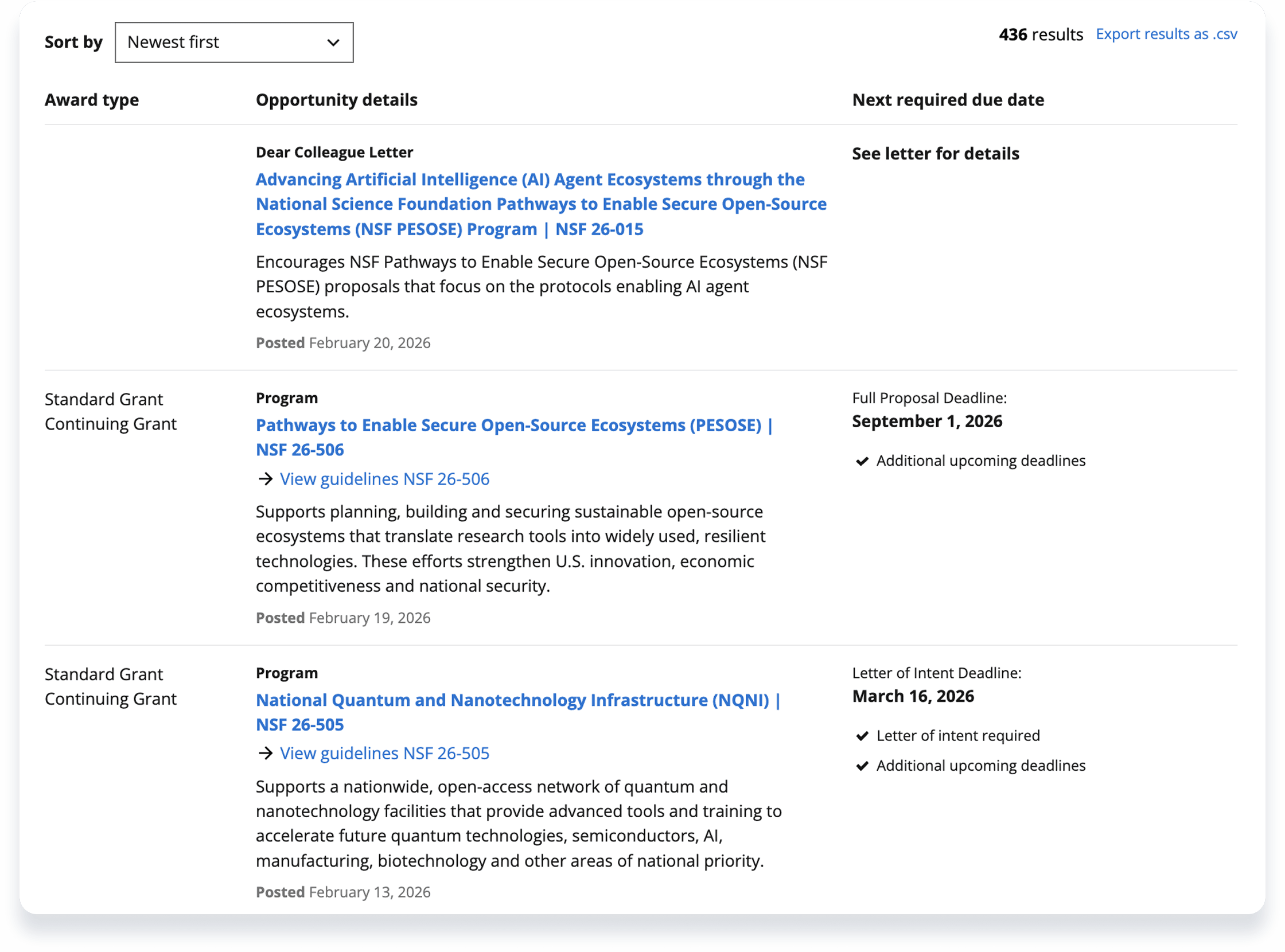
From Paragraphs to Scannable Columns: I replaced the dense text with a strict three-column layout: Award Type, Opportunity Details, and Next Required Due Date. By pulling the most critical data out of the paragraphs and aligning it vertically, users can now scan down the page in seconds.
Smart, Context-Aware Cards: The components intelligently adapt to the data they receive. For example, if the item is a "Dear Colleague Letter," the due date column dynamically updates to "See letter for details" rather than leaving an awkward blank space. For "Archived" grants, a clear yellow badge appears automatically.
A Fully Responsive System: Government data is dense, making mobile design notoriously difficult. I built a comprehensive Figma component library that maps out every edge case and ensures these three columns elegantly stack on smaller screens. This guaranteed a seamless handoff to the engineering team.

Legacy Funding Search Result page
New Funding Search Result page
Key Feature 3: Building a Scalable and Accessible Component Library
The Problem: Designing a modern search engine is only half the battle. Handing it off to developers without a strict system leads to inconsistent interfaces, broken mobile experiences, and accessibility violations—which is an absolute dealbreaker for a federal government platform like the NSF.
The Solution: I didn't just design screens; I built and maintained a robust, fully responsive design system from the ground up to standardize the entire search ecosystem.
A Comprehensive UI Kit: I standardized every interaction point. I created reusable Figma components with multiple states for the Search Bar, Pagination, deep Search Filters, and the complex Funding Search Teasers. By utilizing "Base Components," I ensured that any future UI update would sync effortlessly across the entire platform.
Fully Responsive by Default: Government data is dense, but it still needs to work flawlessly on a phone. I engineered strict responsive behaviors into every component, ensuring that complex filter menus and multi-column result cards elegantly stack and adapt to any screen size.
Federal-Grade Accessibility (a11y): Ensuring equal access for all researchers was my top priority. I baked strict accessibility standards (WCAG and Section 508) directly into the DNA of the design system. I rigorously audited color contrast, defined clear interactive focus states, and ensured readable typography across all device breakpoints.
Funding Search Design System Components
Looking Ahead: Empowering Power Users
While the redesigned core search streamlined the experience for the majority of researchers, power users often need surgical precision. As a Phase 2 initiative, I designed an "Advanced Funding Search" interface to handle highly complex queries.
Humanizing Boolean Logic: Instead of expecting users to type complex search operators (AND/OR/NOT), I translated these database commands into a conversational, easy-to-use form with fields like "All of these words" and "None of these words".
Granular Targeting: I introduced a "Located in" dropdown, allowing researchers to limit their keyword search to specific document fields rather than scanning the entire database.
Complex Forms on Mobile: Advanced search forms are notoriously difficult to use on phones. I designed a responsive layout that cleanly stacks the keyword fields and tucks the secondary dropdowns into a dedicated "Filter & Sort" drawer on mobile, ensuring the tool remains powerful yet uncluttered on any device.
Although currently pending implementation, this unlaunched concept sets a clear "North Star" for the platform's next evolution in discoverability.
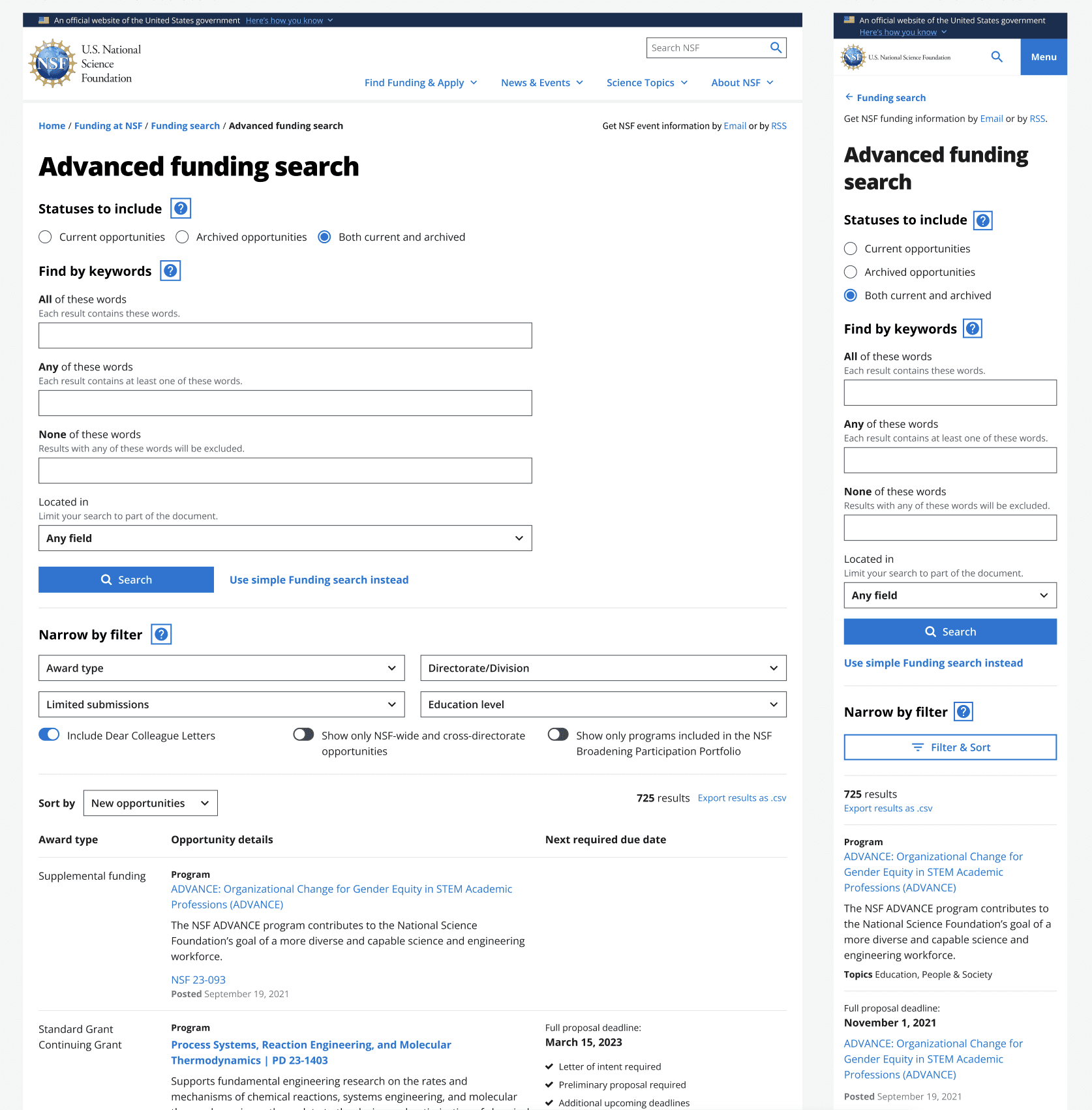
Advanced Funding Search MVP
Outcomes & Takeaways
The Impact:
Scale & Modernization: We successfully modernized a decade-old legacy system into a unified, dynamic search ecosystem. This redesign directly empowers 350,000+ researchers and institutions nationwide, allowing them to discover both active and historical funding opportunities without jumping between disconnected platforms.
Inclusive & Developer-Ready: I spearheaded the creation of a comprehensive Figma component library that strictly adheres to WCAG 2.1 accessibility standards. This not only ensured full inclusivity for all users but also dramatically reduced design-to-development friction, enabling engineers to build and scale the UI efficiently.
The Process & Collaboration:
Cross-Functional Synergy: Designing a federal-grade search engine required tight orchestration. I worked in daily lockstep with Product Managers (PMs) to define feature scope, and partnered closely with frontend engineers and QA teams to ensure our complex, responsive data tables were technically feasible and bug-free prior to launch.
Stakeholder Alignment: Every major UX decision was heavily scrutinized. I actively facilitated design reviews with the client and the NSF Policy Office, successfully aligning government business constraints (like strict data retention laws) with our goal of delivering an effortless user experience.
What I Learned:
Embracing Extreme Constraints: Designing for the government means working with massive amounts of dense data and rigid compliance rules. I learned that "good UX" in this context isn't about trendy aesthetics; it’s about ruthlessly prioritizing information so users don't feel overwhelmed.
Systems Over Screens: I realized the true value of a Senior Designer lies in building systems. Creating that foundational, accessible component library was the key to ensuring UI consistency across hundreds of complex edge cases and multiple engineering sprints.