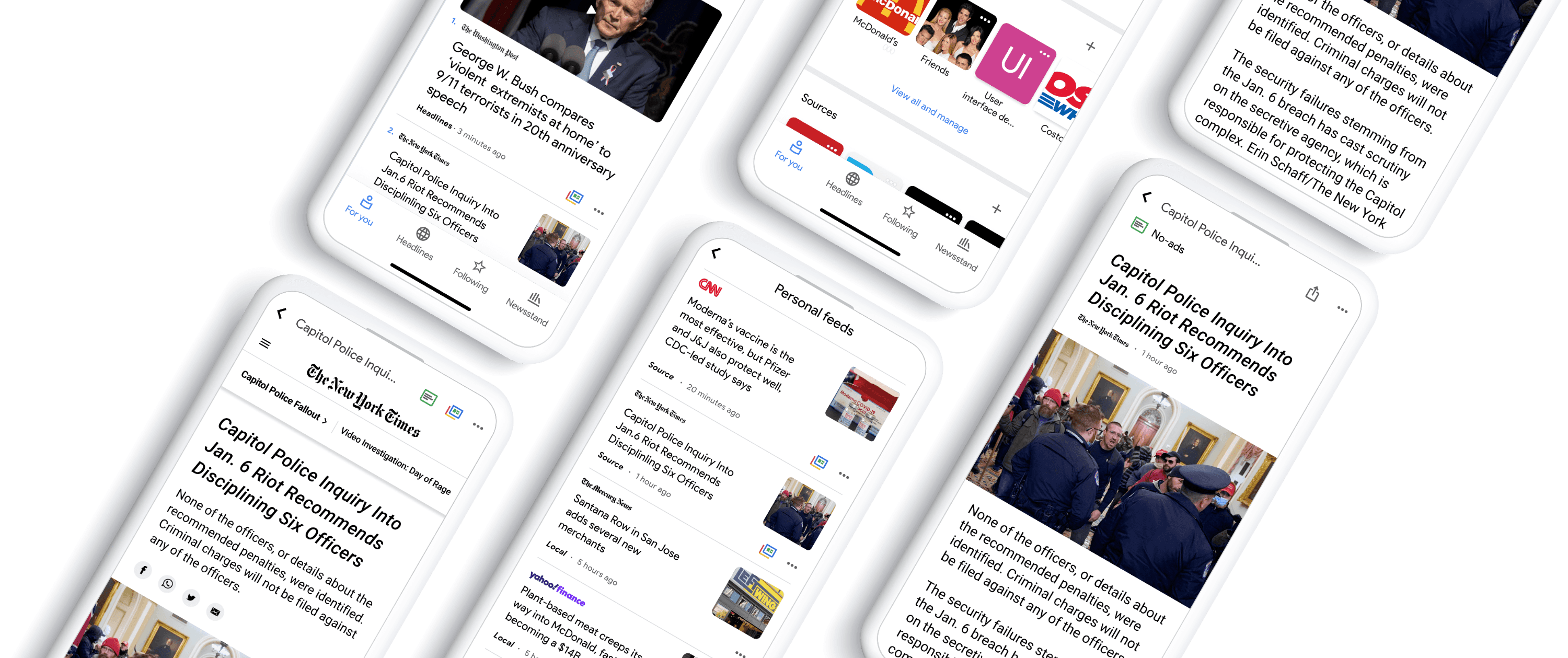
Google News
Improving Google’s news aggregation experience through new feature design.
Role
Product Designer
Tools
Figma
Time
2021
Tags
Product Enhancement
Product Design
Case Study
News Platform
📋 Challenges & Design Approach
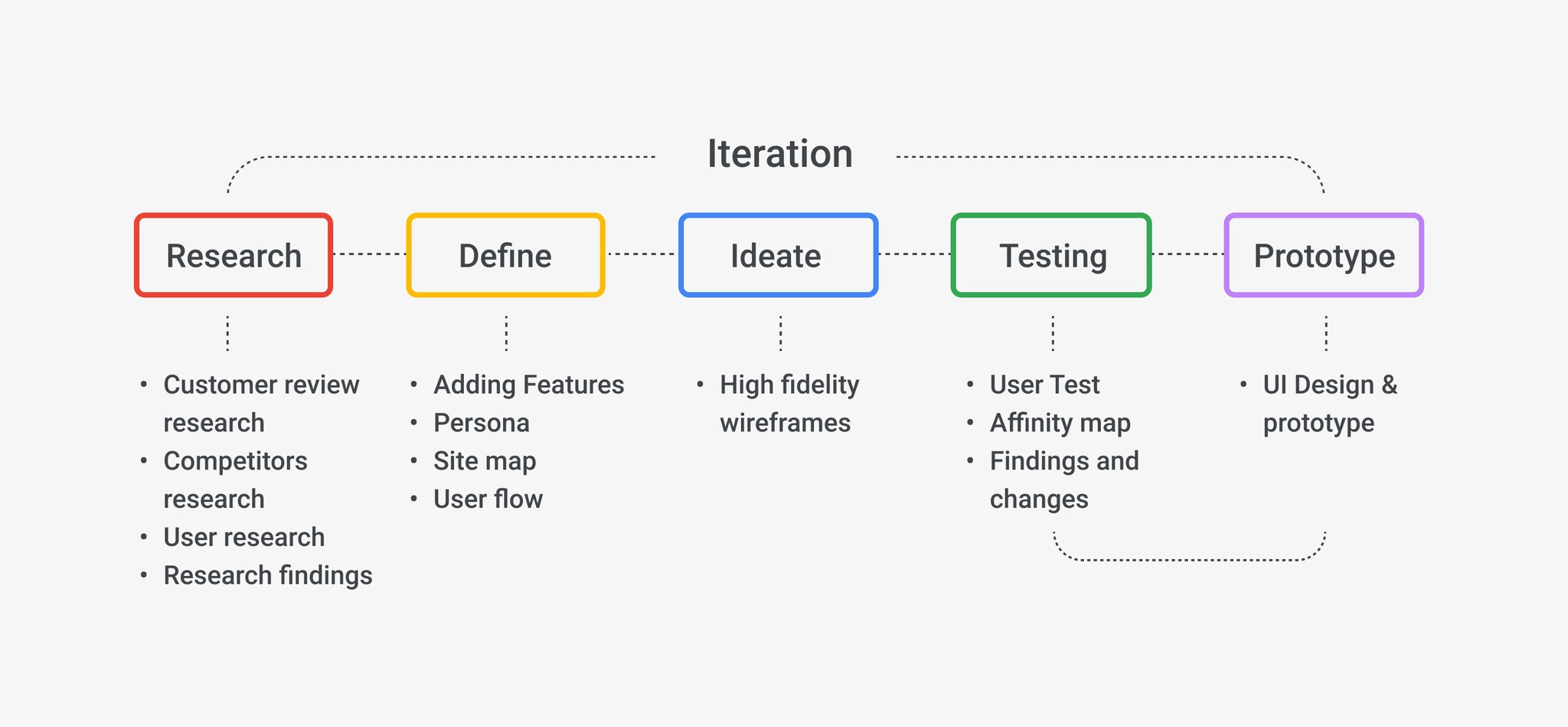
A user-centered workflow guided the project through research, ideation, testing, and iteration.
🔍 Research
💬 Customer review research
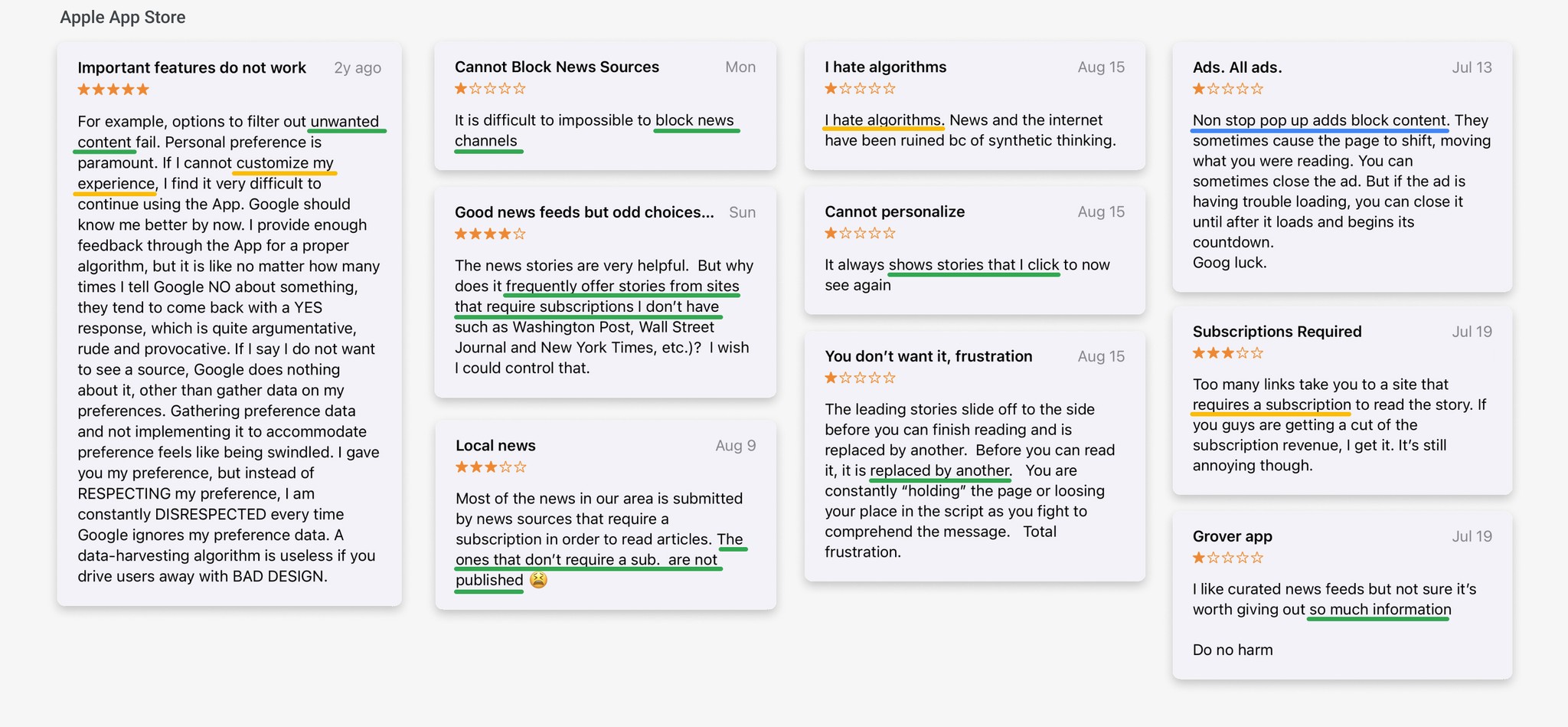
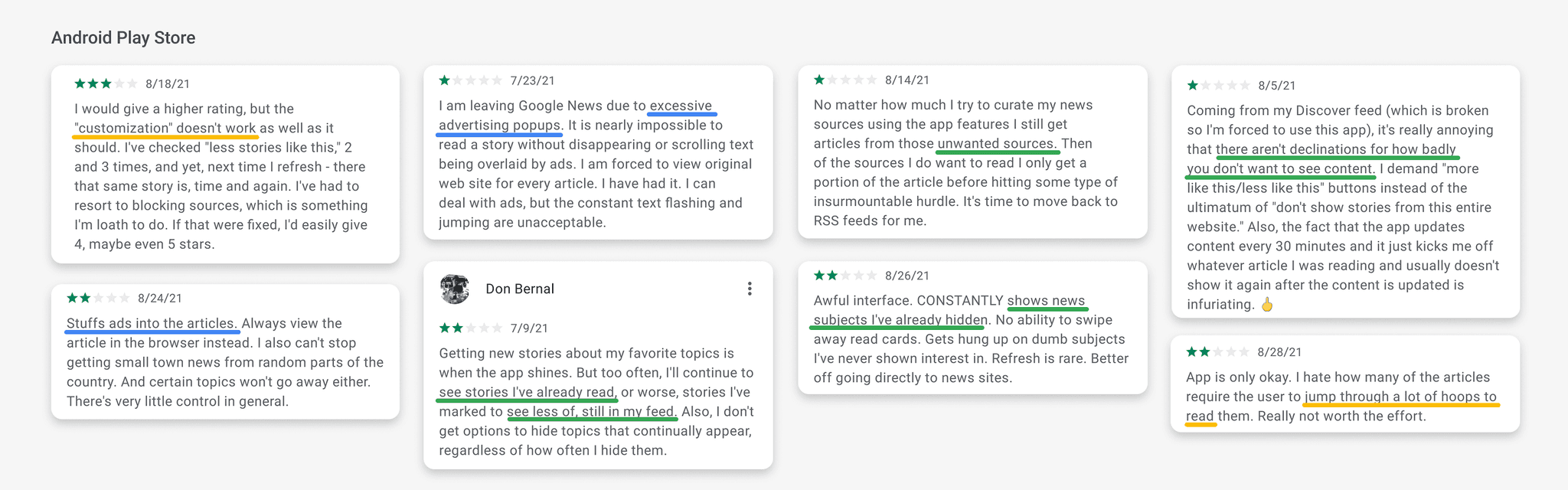
App store reviews provide a valuable window into how users perceive a product. In addition to positive feedback, negative reviews from both loyal and new users often highlight pain points and unmet needs.
I analyzed user reviews from major app stores and collected relevant insights to better understand user frustrations, expectations, and areas for improvement.
⛓️💥 Problems
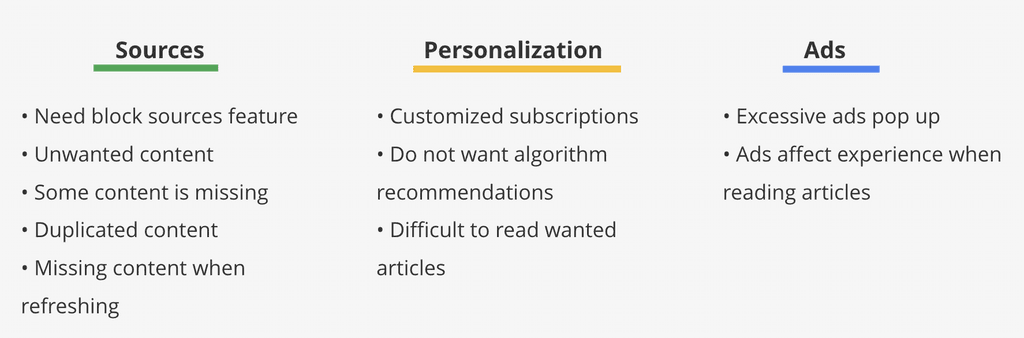
After reviewing customer feedback from both the iOS App Store and Google Play, I noticed a surprising pattern - many of the negative reviews mentioned similar issues. This consistency revealed clear user pain points and highlighted an opportunity for Google News to improve retention and expand its user base through thoughtful feature additions.
📝 Competitor Research
With countless news apps in the market, competitive analysis is essential to understanding current trends and feature strategies. Traditional media outlets like CNN and The Washington Post have shifted their focus toward digital experiences, while enterprise-level platforms such as Apple News serve as direct competitors in terms of scale and design.
Emerging players like NewsBreak and SmartNews are gaining traction by emphasizing personalization, algorithm-driven feeds, and location-based content - pointing to the future direction of the news app ecosystem.
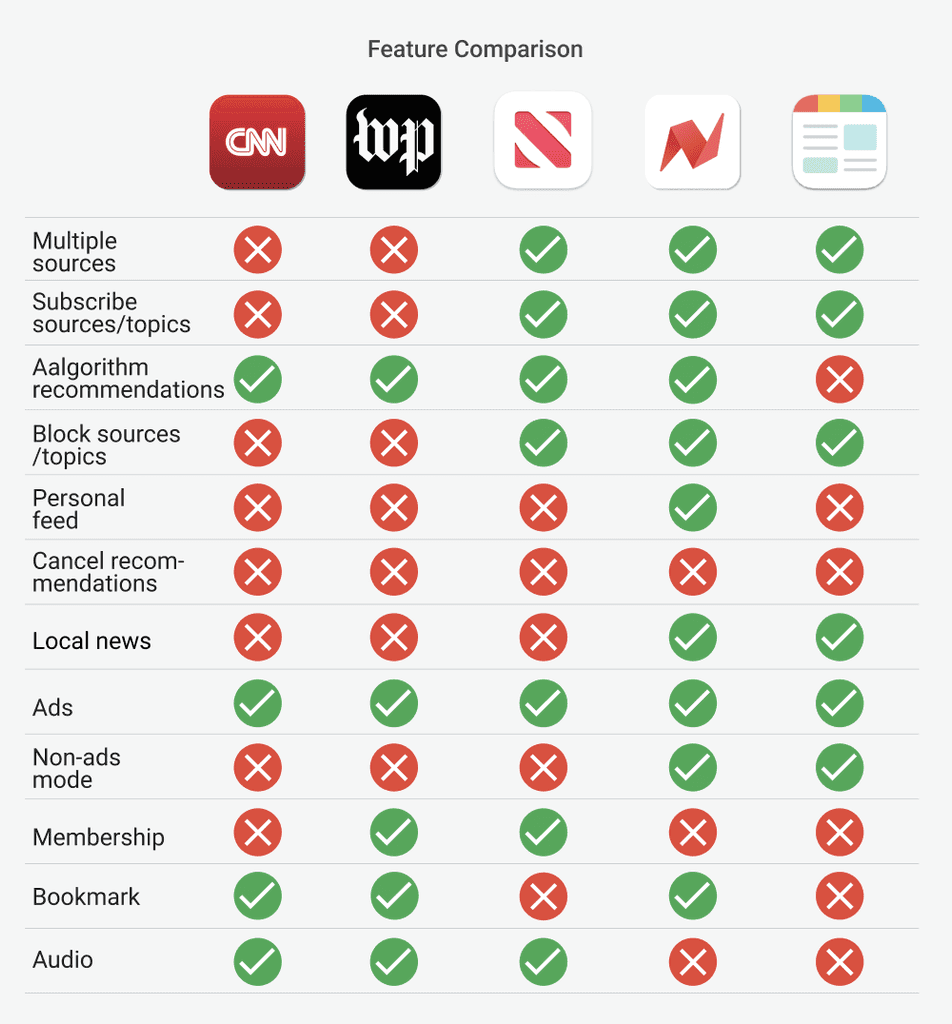
I analyzed these platforms to better understand their feature sets, user experience patterns, and strengths and weaknesses. This research provided valuable insight to inform the feature additions and design decisions for Google News.
📃 Findings
The competitor research gave me valuable inspiration in terms of features and user experience.
Traditional media apps like CNN and The Washington Post focus more on delivering original content instead of aggregating news. Their features and UI are cleaner, and they often include audio content and fewer ads, which creates a better reading experience for users.
As an enterprise-level app, Apple News does a good job bridging traditional and emerging media. Its modern, clean UI, integrated audio, and minimal ads are clear strengths.
Emerging apps like NewsBreak and SmartNews are also strong competitors. They include local news, which became especially important during the pandemic. For users who don’t enjoy the UI of traditional platforms, these apps offer ad-free and clean reading modes.
I believe these findings could inspire new feature ideas to help Google News stay competitive in the market.
💬 User Interview
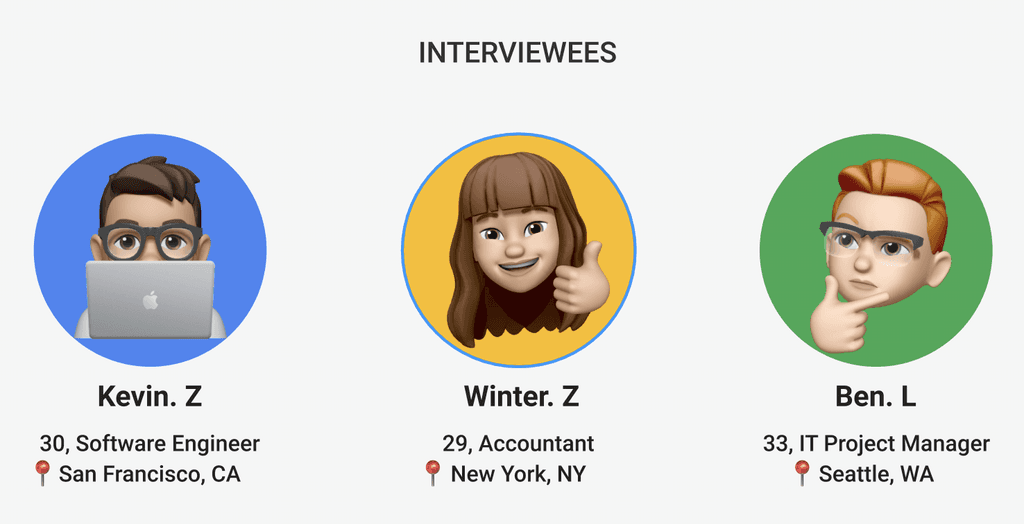
I interviewed three users who regularly check news on their mobile apps, including daily updates, breaking news, and topics of personal interest. I prepared questions around their routines for staying informed, and it quickly became clear that mobile news apps have become one of the most popular and convenient sources.
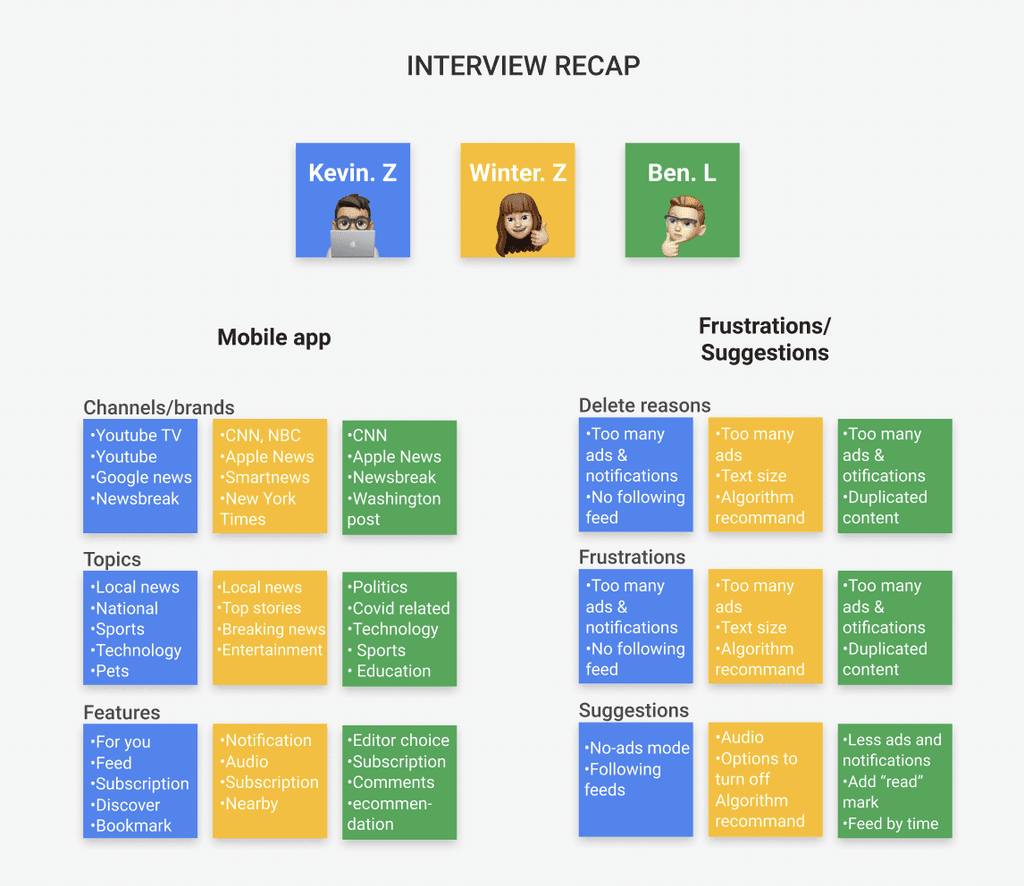
While traditional channels like TV, newspapers, magazines, and radio still exist, they must evolve digitally to remain relevant. Each interviewee had a different lifestyle, but shared some common habits and frustrations when using news apps like Google News, Apple News, NewsBreak, or CNN.
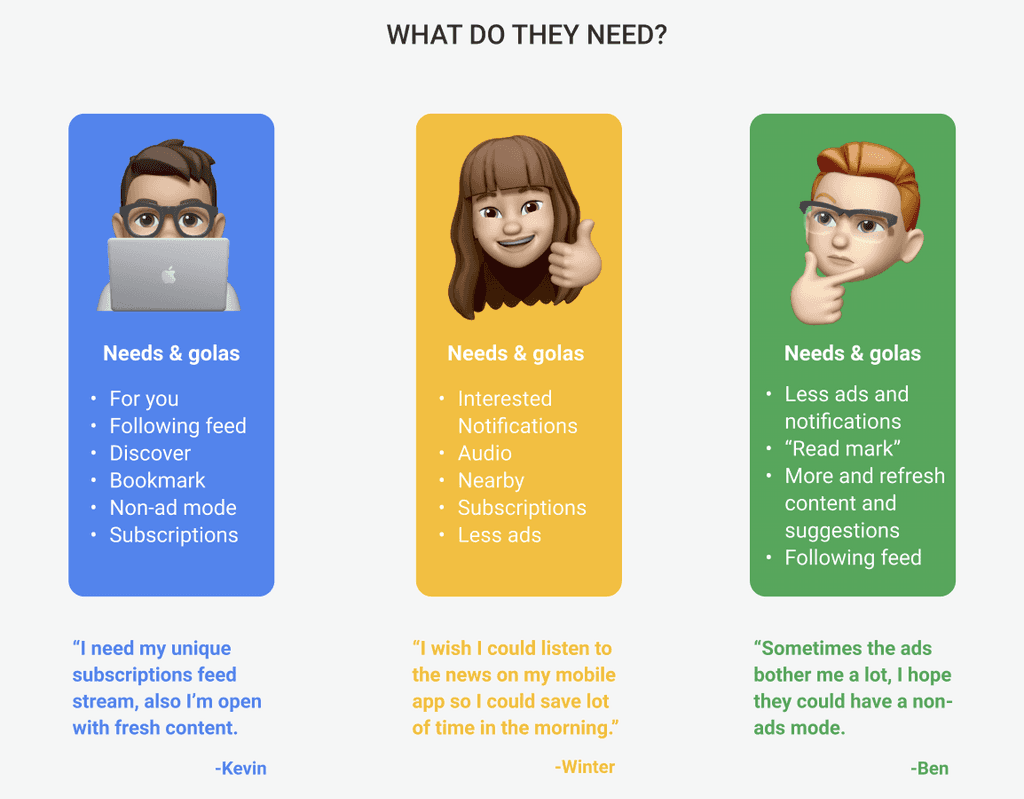
After the interviews, I summarized their feedback, including pain points, expectations, and even suggestions. These conversations offered valuable insights and directly inspired new ideas for potential features.
📃 Findings
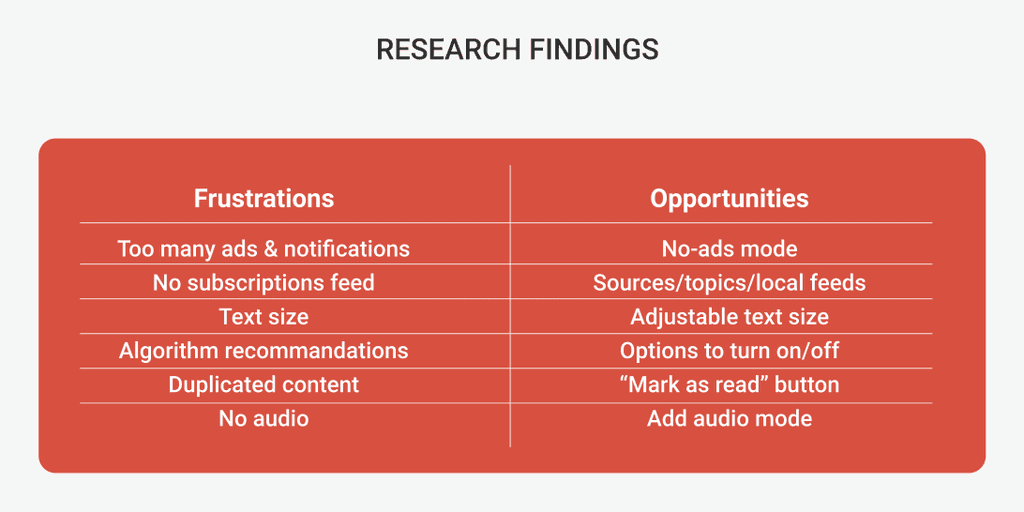
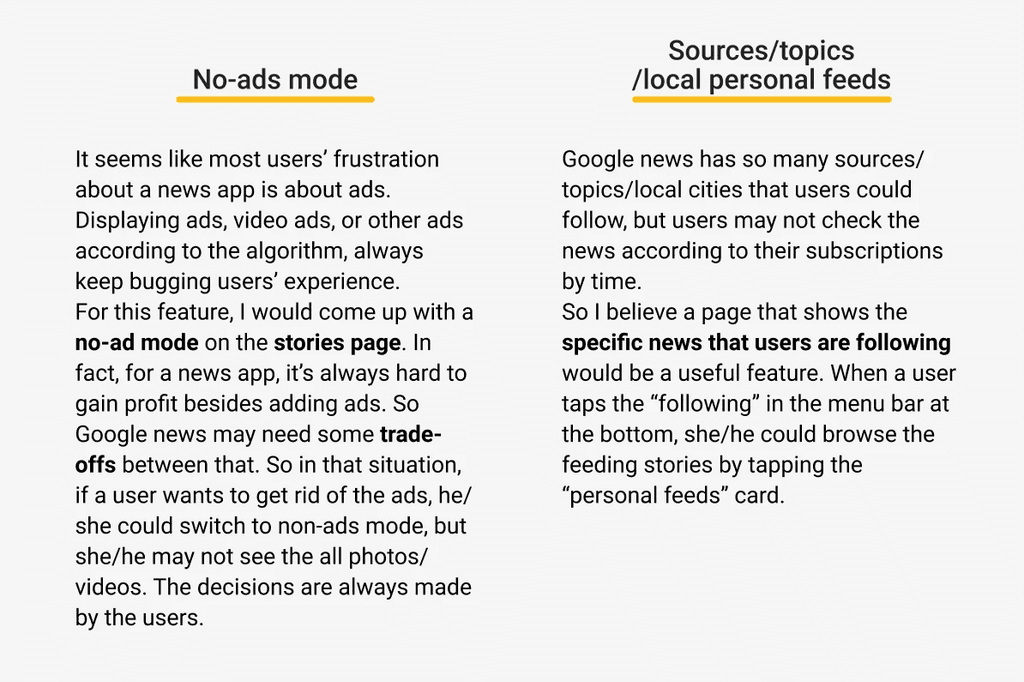
Based on insights from the user interviews, I saw clear opportunities for news apps to improve the overall user experience. Combined with feedback collected from the iOS App Store and Android Play Store, it became evident that ads were one of the most common pain points.
This led to the idea of adding a feature to improve the ad experience, along with a personalized feed based on each user’s subscriptions and interests.
🎯 Define
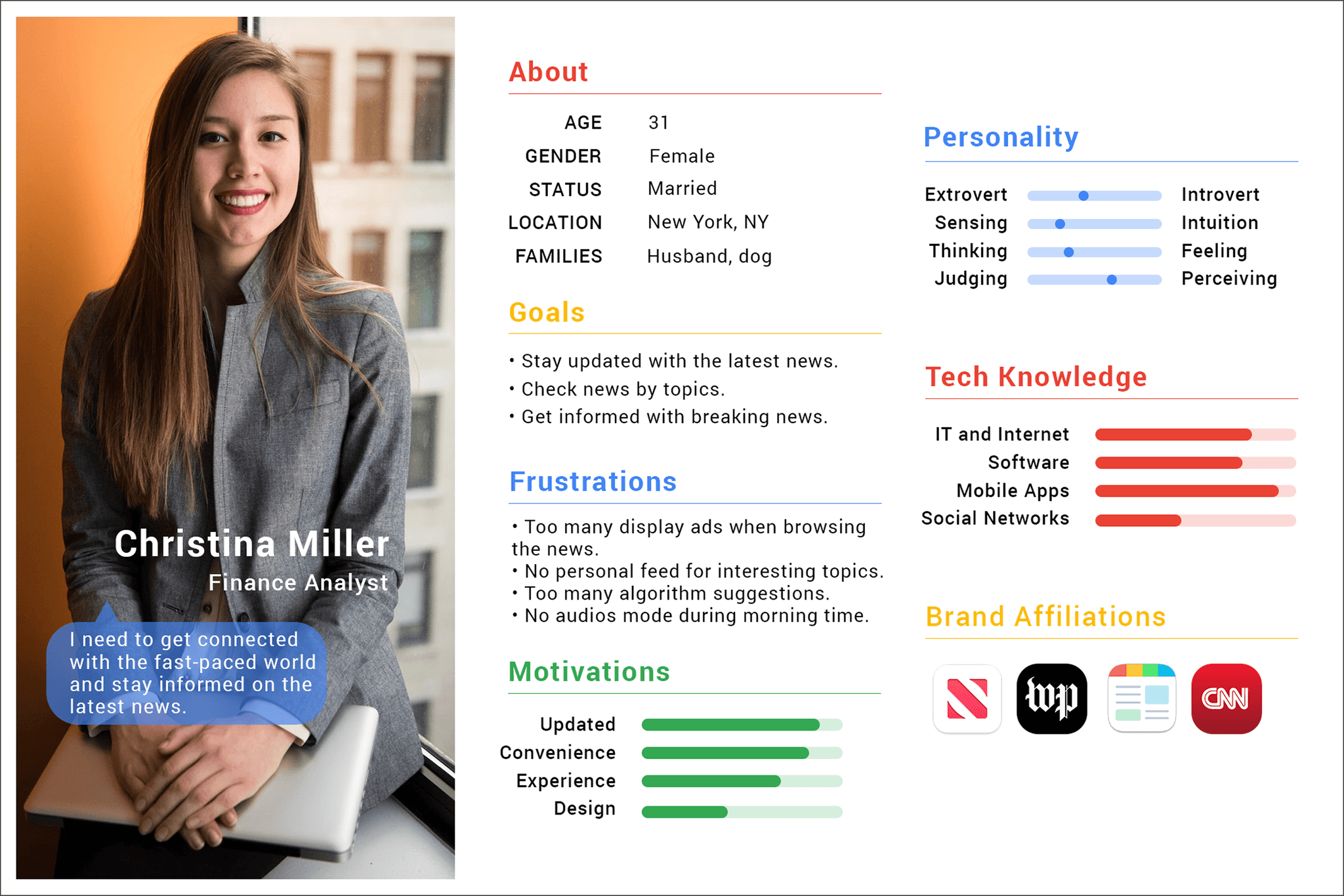
👩💼 Persona
Christina Miller is a financial analyst based in New York - one of the most fast-paced cities in the world. She relies on mobile news apps to stay up to date not only for work-related information, but also for personal interests and daily headlines.
🪄 Feature Additions
📊 Site map & flow chart
🔁 Ideate
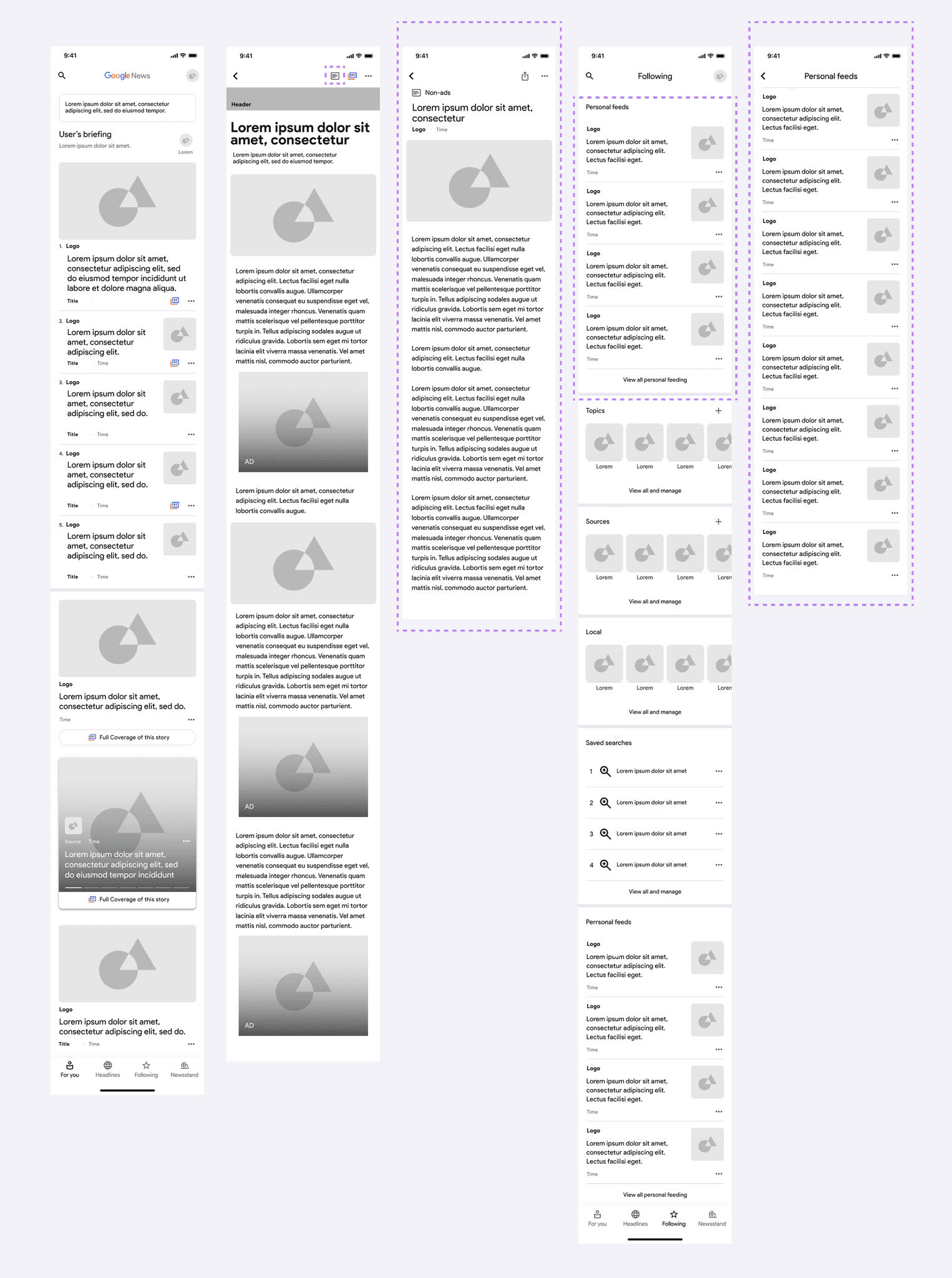
High-fidelity wireframes
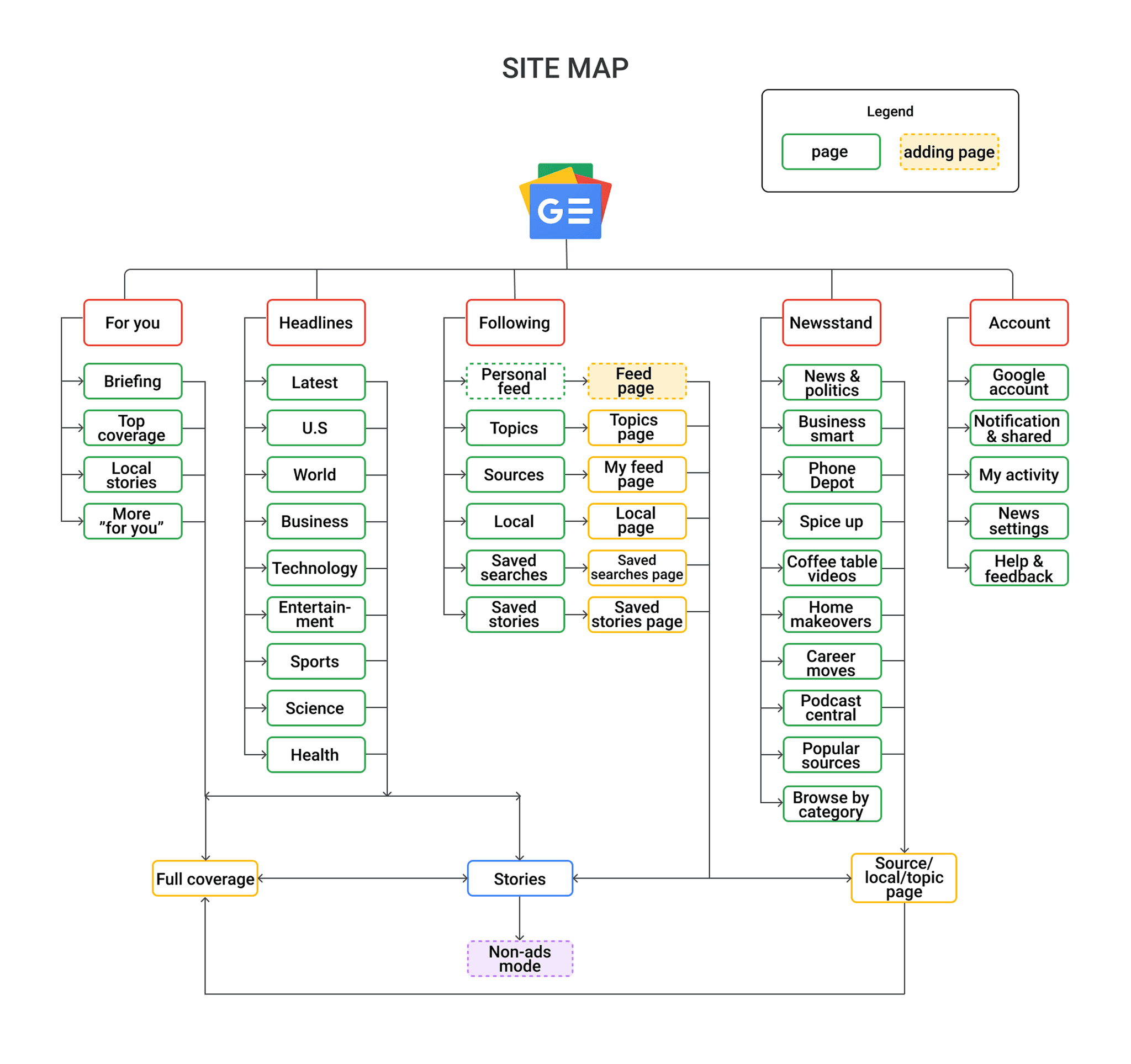
After finalizing the two added features, sitemap, and user flows, I began designing wireframes based on Google’s Material Design guidelines.
For the no-ads mode, I created a custom icon, since this feature isn’t included in the default Material icon set. I used green to represent a clean, unobstructed reading experience, and incorporated horizontal lines to symbolize text-only content. The no-ads page allows users to browse simplified, distraction-free stories.
For the personal feeds feature, I integrated it into the existing “Following” page, where users already manage their subscriptions. This placement ensures a logical connection between features. I positioned the personal feed section at the top of the page so users can see it immediately upon landing. The section displays up to four stories, with an option to tap “Personal Feeds” or “View All Personal Feeds” to explore the full list.
The dedicated Personal Feeds page displays all subscribed stories, sorted from most recent to oldest.
🔘Testing
👣 User Testing
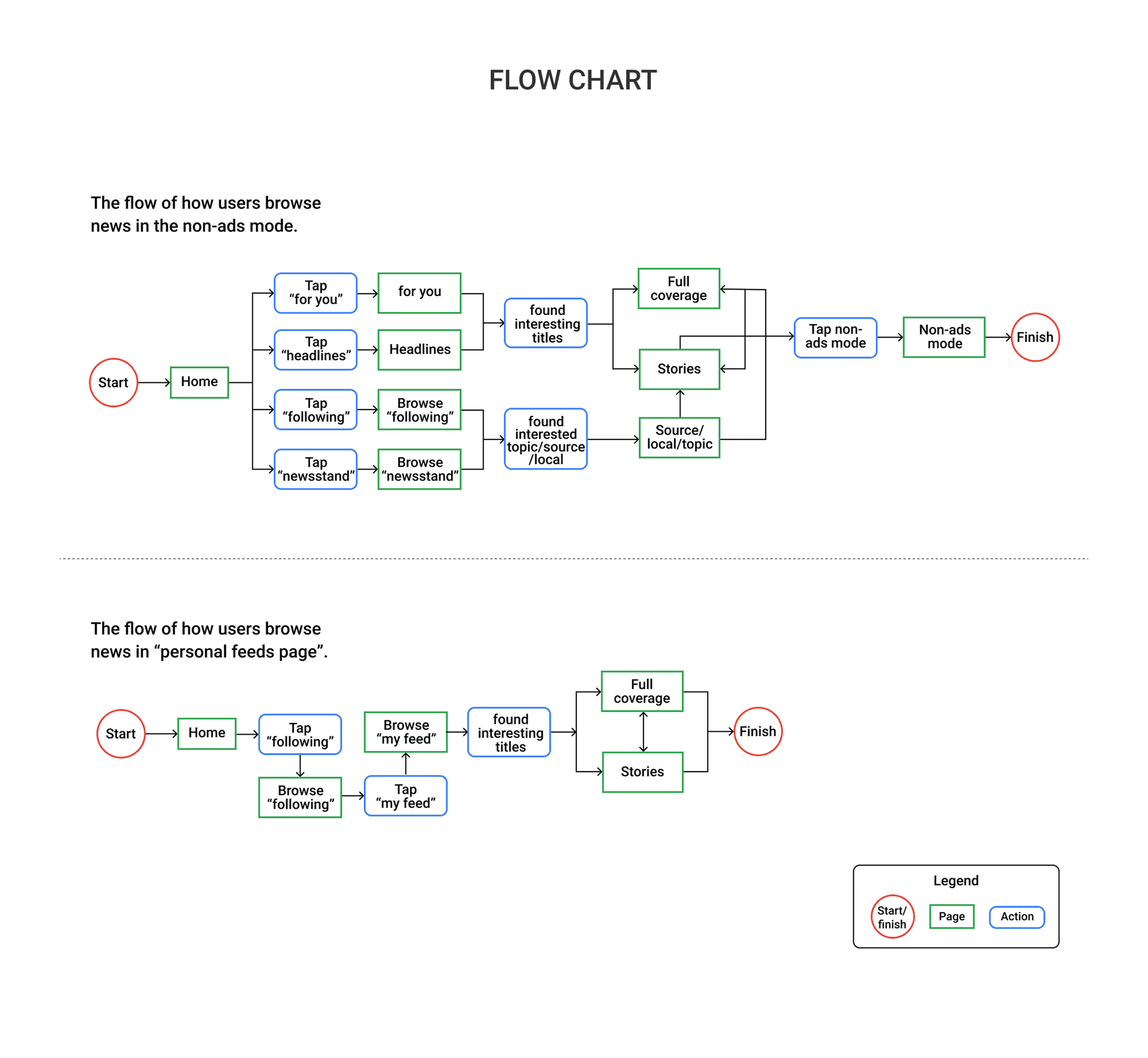
After designing the high-fidelity wireframes, I conducted user testing using an interactive prototype. The goal was to validate the two newly added features and observe how users interact with them.
Participants were asked to complete the following tasks:
Read a story using the No-Ads Mode
Access their Personal Feeds via the “Following” tab
Open a story from Personal Feeds and view it in No-Ads Mode
This testing helped evaluate the clarity of interactions and whether the new features integrated smoothly into the existing app flow.
📋 Affinity Map
I collected feedback from my interviewees and an additional participant after testing the prototype. Using an affinity map, I organized their pain points, suggestions, and reactions related to the two added features.
This process helped surface common themes, areas for improvement, and also some positive feedback on the overall wireframe experience.
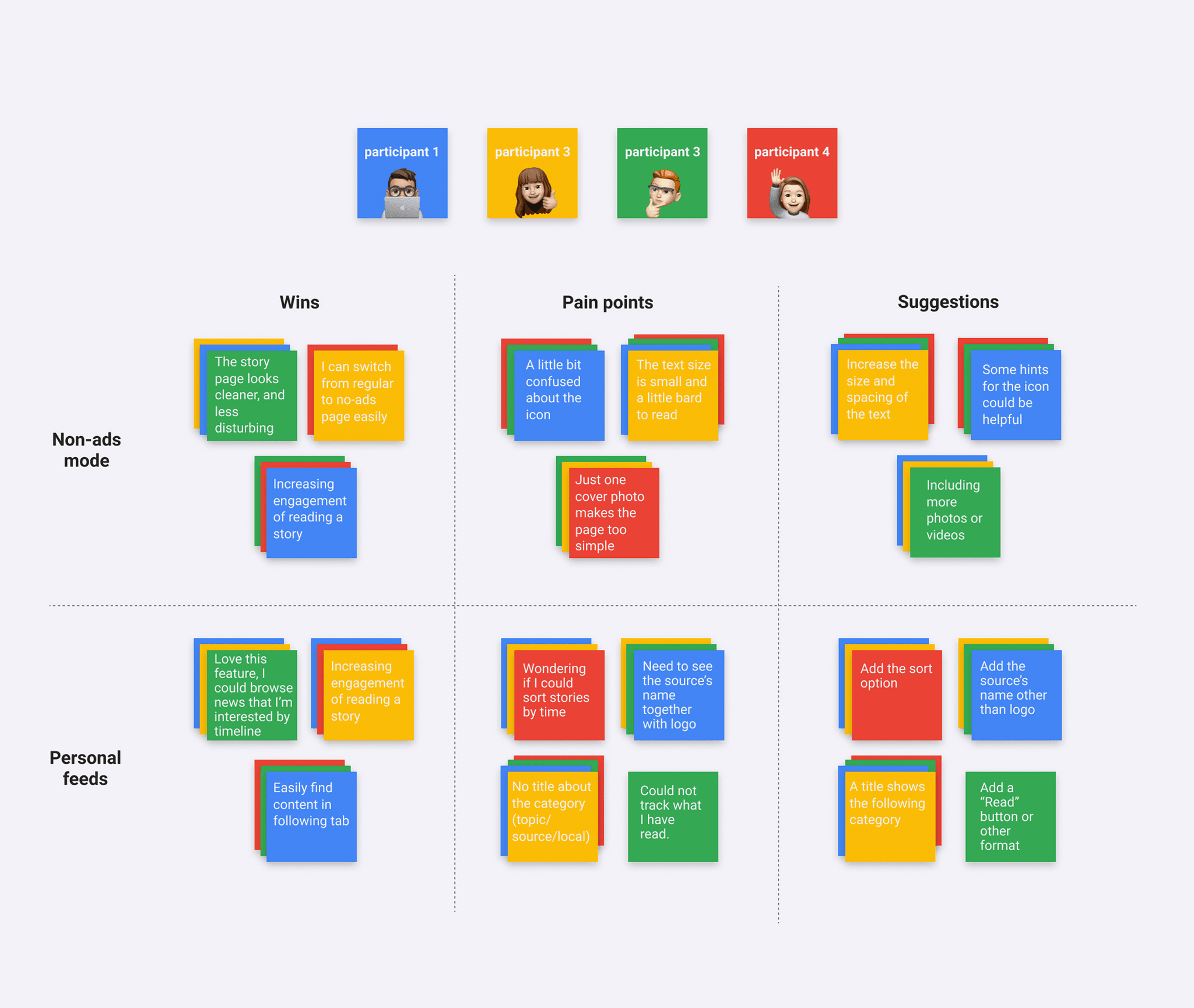
The user test gave me valuable insights, especially regarding the limitations of the wireframes.
For the No-Ads Mode, text size could be improved. Since users only see text on the page, increased spacing and slightly larger typography could enhance readability without hurting the experience.
Regarding the icon, users may not immediately recognize its meaning. However, once redirected to the No-Ads page, similar to the Full Coverage view—the article title is clearly shown. For now, I plan to keep the icon design.
Currently, only the cover photo or video is displayed. Since news apps often rely on ads for revenue, this becomes a trade-off between an ad-free experience and rich visuals. I believe there’s potential to refine this feature and possibly unlock more images or videos in the future.
For the Personal Feeds, some participants mentioned they’d like a sorting option. At the moment, this feature is designed to display stories chronologically, similar to Facebook or Twitter, so I plan to keep it as is.
The source name will be displayed next to the logo, following the format used on the “Saved Stories” page.
Adding a label for the following category (e.g. topic, local, or source) was a great suggestion. This will help users better understand where each story comes from.
Lastly, Google News doesn’t currently offer a “mark as read” feature, so I’ve kept the original design. However, I see this as a valuable idea for future enhancements.
Based on feedback from user testing and interviews, I made a few key adjustments to improve clarity and usability in both added features. The changes focused on readability, visual context, and better alignment with user expectations:
No-Ads Mode
• Increased text size and spacing
Personal Feeds
• Added source name and logo
• Added category label (topic/local/source)
▶️ Prototype
I began designing the UI based on feedback from the wireframe usability testing. The following steps demonstrate how users interact with the new features, including reading a story in No-Ads Mode and browsing Personal Feeds through the “Following” tab.
Homepage
On the Google News homepage, users can explore content under the “For You” tab. They can tap on any story or coverage card directly from this view.

Story Page
Tapping on a story takes the user to the article detail view, which links out to the original source’s website.

No-Ads Mode Page
If the user prefers a cleaner reading experience, they can tap the No-Ads Mode icon. This mode shows only the cover image and text, hiding most inline photos or videos. Users can return to the standard view at any time by tapping the “Go Back” icon.

Following Page
Tapping the “Following” tab leads to a personalized section where the Personal Feeds card appears at the top. It displays up to four stories. To see more, users can tap “Personal Feeds” or “View All and Manage” to open the full list.

Personal Feeds Page
This page shows all stories from the user’s followed sources, topics, and local news. Content is sorted chronologically, from most recent to oldest. Tapping a story opens the full article in the source’s detail page.

✍️ What I Learned
This case study focused on adding new features to an existing mobile product. I believe this is a common challenge that most product designers will encounter in their careers, especially when working at large-scale companies like Google. Through this project, I gained several valuable takeaways:
• Understanding Google Material Design
Google Material Design is a flexible design system built on best practices for UI. I used its open-source components to create wireframes and build the UI, following Google’s standards for color, typography, layout, and shape. This process helped me deeply appreciate the importance of visual and structural consistency, which is especially critical in a product ecosystem as large and interconnected as Google’s.
• The Power of Research
I began by analyzing real customer reviews from the iOS App Store and Google Play. These raw, user-driven insights helped uncover product pain points from a ground-level perspective. Competitive research also broadened my understanding by showing what other news apps are doing well, where they fall short, and what opportunities exist for Google News. In addition, conducting user interviews made the findings more concrete by grounding decisions in real-world needs and behaviors. This research process helped me better understand when a product needs iteration, how to prioritize features, and which user frustrations are most important to address. Even with many possible directions, I was able to focus on features with broader relevance and impact.
• Designing for an Existing Product
It’s never easy to introduce new features into an established product, particularly when the changes are significant. Through this process, I realized that as a product designer, my responsibility is not just to create something new, but to integrate it thoughtfully into what already exists. That required a solid understanding of Google News as a whole, including its Material Design system, product architecture, and interaction patterns. With the support of clear user flows, a well-structured sitemap, and detailed wireframes, I was able to incorporate the two new features smoothly into the existing app experience.